Questions:

How can I benefit from Shortcut Icon? Where will my logo be seen?

I used to see Shortcut Icons, but now they've disappeared. What happened?


Does Shortcut Icon pose any security or privacy concerns?


I have a Shortcut Icon file, but I don't see it in my favourites folder when I bookmark or rebookmark my site. What's wrong?



Screenshot from the EPS Web site


frequently asked questions (f.a.q)
How can I benefit from Shortcut Icon? Where will my logo be seen?

Your logo will appear in 6 different places in Microsoft's Internet Explorer (versions 5.0 and up) and Linux's Konqueror Web browsers on PC computers. Shortcut Icon will help brand your Web site, gaining valuable name and logo recognition.

Go to the What is Shortcut Icon? page to view the 6 locations where your Shortcut Icon will appear.

Back top the top


I used to see Shortcut Icons, but now they've disappeared. What happened?

Shortcut Icons are stored on your computer in a similar way to Web (html) documents, that is, they are added to your computer's cache. Shortcut icons are removed from the cache when you clear the history of visited sites. When the cache is cleared, the Shortcut Icons are deleted and your Web browser reverts to the standard icon.

To prevent Shortcut Icon from disappearing:

1. Create a local directory (IE c:\shortcuticons)
2. Copy the desired Shortcut Icon into the directory created above.
3. Right click the mouse over the favourite/bookmark and select Properties.
4. Enter the path (or use the 'browse' feature) to the Shortcut Icon you want for that bookmark.

An alternate temporary solution is to hold down the mouse button while holding shift over the default Internet Explorer icon in the address bar and then let go of the mouse button anywhere in the address bar. This method seems to 'update' the Shortcut Icon.

Back top the top


Does Shortcut Icon pose any security or privacy concerns?

Evidently there are no concerns with the Konqueror browser as it checks for Shortcut Icons whether or not the Web site visitor bookmarks your page. However, when you bookmark a page in Internet Explorer, the browser requests the Shortcut Icon file. The Web surfer is unaware that a request has been made and users are unable to turn this feature off. The Web site operators can later use their logs to build a record of the user's bookmarked pages. It may then be possible to track visitors via a cookie. This would allow sites to build more profiles of visitor interests. In summary, there are very few privacy concerns that result from the bookmarking process.

Back top the top


I have a Shortcut Icon file, but I don't see it in my favourites folder when I bookmark or rebookmark my site. What's wrong?

If your Shortcut Icon has not been made by us, it may not have been created in the correct format. However, if you are sure you have a bona fide Shortcut Icon and are having trouble seeing your new icon, it is probably because you had an existing bookmark for that page - it is difficult to change existing bookmarks. Rest assured, however, your new bookmark is visible to the rest of the world and any new bookmarks will be seen with that logo.

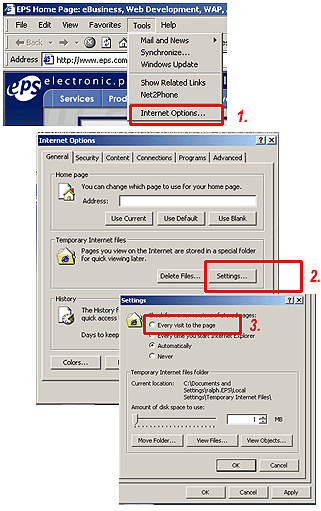
When all else fails, try the following method to see the new logo:

Delete your computer's cache -
1. Go to the Tools menu and select Internet Options and select the general tab.
2. In Temporary Internet Files, select Settings.
3. Select "check for new versions of stored pages"

This way your browser will be forced to check for new Web pages every time you visit the Web site.

Back top the top
